Sunday, April 6, 2008
Thing 9 Online collaboration tools
I have used Google docs for a couple of school related things many of us were working on. It was very nice to log in, see what the other people had written and be able to add my thoughts to theirs and record my own concerns for others to see. It was easy to use once I figured the system out. I liked it. I also just tried the Zoho document writing one also. It was easy to start my document, and add names of people who could have access. Either one would be a great way for students or staff to collaborate on a writing assignment without everyone having to be in the same place at the same time. I will definitely show both of these to my staff and students.

Thing 8 Sharing presentations
I tried Zoho show and found I had to put my jpg photos into power point format for Zoho to be able to access them. I was just looking to do something quick. I found creating the power pount first was time consuming. I had figured I could create the slideshow as I went in Zoho. Any power point presentations I have created to this point, I have saved on two flash drives and that seems to work for me. I am uncomfortable putting my things on the web for all to see. But I mght think about trying it. I can see some benefits (your flash drive quits working, or you forgot to grab it/them).
More of Thing 6 Image generator / jigsaw puzzle
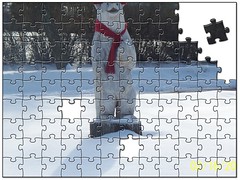
Mr. Bear
Originally uploaded by kvandanacker
Our carved bear in our front yard is quite the talk of the neighborhood
Thing 7 Online communication tools
I use email daily in my elementary schools, communicating with staff. Elementary students do not have email accounts, but they would be a very useful way to communicate with students about library materials (overdues, books or other materials they are waiting for that have come in).
I have used instant messaging a couple of times personally, talking to friends on line. It was OK, sometimes it seemed to be on the slow side. But I will contuine to use it. It just isn't my first choice.
I use SMS on my cell phone quite often again for personal things. It's a great way for family to send me messages, without the annoying ringing of a phone. It also allows me to send a message if I need to without disturbing other peoples meetings or appointments. I am sure many high school libraries use this method to communicate with students and staff. Elementary students are generally not allowed phones in school.
A fellow librarian and I talked about setting a chat session, but we have gotten so busy it hasn't happened.
I recently tried participating in a webinar. Before the presentation started I had great audio. As the presentation started I lost the audio and couldn't figure out how to get it back, so finally just exited the webinar.
I have used instant messaging a couple of times personally, talking to friends on line. It was OK, sometimes it seemed to be on the slow side. But I will contuine to use it. It just isn't my first choice.
I use SMS on my cell phone quite often again for personal things. It's a great way for family to send me messages, without the annoying ringing of a phone. It also allows me to send a message if I need to without disturbing other peoples meetings or appointments. I am sure many high school libraries use this method to communicate with students and staff. Elementary students are generally not allowed phones in school.
A fellow librarian and I talked about setting a chat session, but we have gotten so busy it hasn't happened.
I recently tried participating in a webinar. Before the presentation started I had great audio. As the presentation started I lost the audio and couldn't figure out how to get it back, so finally just exited the webinar.
Wednesday, March 19, 2008
More of Thing #6 image generators

This was fun to play with. I could see something eye catching like this at the top of my library page on the school website.
Sunday, March 9, 2008
Thing # 6 Online Image Generators

Created with dumpr.net - fun with your photos
Playing with the image generators was really fun. The dumpr site was interesting. This is my grandson being a fish. I plan to spend much more time playing here. But I have other things to do right now.
I also experimented with the trading card program. As someone suggested it would make really different business cards. I think that will be my next project, making some new business cards for myself. I will post one of my trading cards here. I didn't know most of these places were out there. I need to think about other ways I can use them at school.

Sunday, March 2, 2008
Thing # 5 More Flickr Fun
Wow the possibilities available on Flickr to create new formats,and ways to use my photos. I was impressed how easy it was to use the fd Flickr toys to manipulate my photos. One of the activities I had the most fun with was the "Hockneyizer. I have a couple of photos of our grandson's big blue eyes I want to scrapbook that way. Now that I know how to do it I just need to find the photos again on my computer.
I also enjoyed playing with the jigsaw puzzle maker. I have several photos I would like to do that with and give to the person as a gift. It would be neat to do with photos of activities at school to have for the students to use in their free time.
The pocket album feature is a really fast efficient way to make little albums as gifts for parents, grandparents, godparents, or people who don't have a lot of room to display photos.
I also tried a couple of photos in the Warholizer, but I wasn't crazy about how they looked. I was never a big fan of Warhol's art anyway.
I could using the mosaic or poster programs to create advertisements or displays of activities at school. All in all I would say this was the funnest activity so far.
I also enjoyed playing with the jigsaw puzzle maker. I have several photos I would like to do that with and give to the person as a gift. It would be neat to do with photos of activities at school to have for the students to use in their free time.
The pocket album feature is a really fast efficient way to make little albums as gifts for parents, grandparents, godparents, or people who don't have a lot of room to display photos.
I also tried a couple of photos in the Warholizer, but I wasn't crazy about how they looked. I was never a big fan of Warhol's art anyway.
I could using the mosaic or poster programs to create advertisements or displays of activities at school. All in all I would say this was the funnest activity so far.
Subscribe to:
Posts (Atom)
